Claude Code plugin¶
The skills and subagents this repository ships are also published as a single Claude Code plugin, so you can install them once and let Claude Code keep them up to date, instead of copying files into every repository.
Both distribution paths are supported and neither replaces the other:
Path |
Command |
What lands on disk |
|---|---|---|
Files |
|
A copy of every skill and agent, committed to your repo |
Plugin |
|
Nothing: Claude Code caches the plugin outside the repo |
The plugin also reaches further than the files do. Claude Code discovers skills in ~/.claude/skills/ and a repository’s .claude/skills/, but Cowork and cloud sessions do not read either: they load what is enabled for your account. A plugin is the only form those surfaces accept, so init skills cannot reach them by design. See § Install in Claude Desktop.
Note
That reach now runs both ways. A plugin enabled for your claude.ai account is cached into ~/.claude/plugins/synced/ and loaded by the CLI on its own, with no local install: claude plugin list groups those entries under Synced from claude.ai, and names this catalog’s own plugin repomatic@synced. Verified against Claude Code 2.1.274 on 2026-09-29.
So the two paths above overlap, where they used to be disjoint. Take both for the same assets, by enabling the plugin for your account and running init skills, and every skill is registered twice: once bare from the skill directory, once namespaced by the plugin. Both copies then sit in the context of every session. Pick one route per machine.
Install¶
Register the marketplace, then install the plugin:
$ claude plugin marketplace add kdeldycke/repomatic
$ claude plugin install repomatic@kdeldycke
The same two steps work as /plugin marketplace add and /plugin install from inside a session, where /plugin also offers an interactive browser.
Skills and agents arrive namespaced by the plugin, so /repomatic-changelog becomes /repomatic:repomatic-changelog and the QA agent is repomatic:qa-engineer.
Important
The marketplace reads the plugin directory straight from this repository through a git-subdir source, so git must be on your PATH (2.25 or later, for sparse-checkout cone mode). A Claude Code too old to know the type reports This plugin uses a source type your Claude Code version does not support, and versions before 2.1.120 fail to load the marketplace at all. Check yours with claude --version; 2.1.236 handles it.
What it ships¶
Every skill and agent, and nothing else: the 19 skills listed on the skills page and the 3 subagents on the subagents page, read straight from .claude/skills/ and .claude/agents/ on main. Those directories stay the single source of truth, so there is no second copy of any skill in the repository and what you install is what you can read there.
.claude/ is the plugin: it already holds skills/ and agents/ at the locations the plugin spec scans, so the manifest at .claude/.claude-plugin/plugin.json declares metadata only and no component paths:
.claude/
├── .claude-plugin/plugin.json
├── agents/{name}.md
└── skills/{name}/SKILL.md
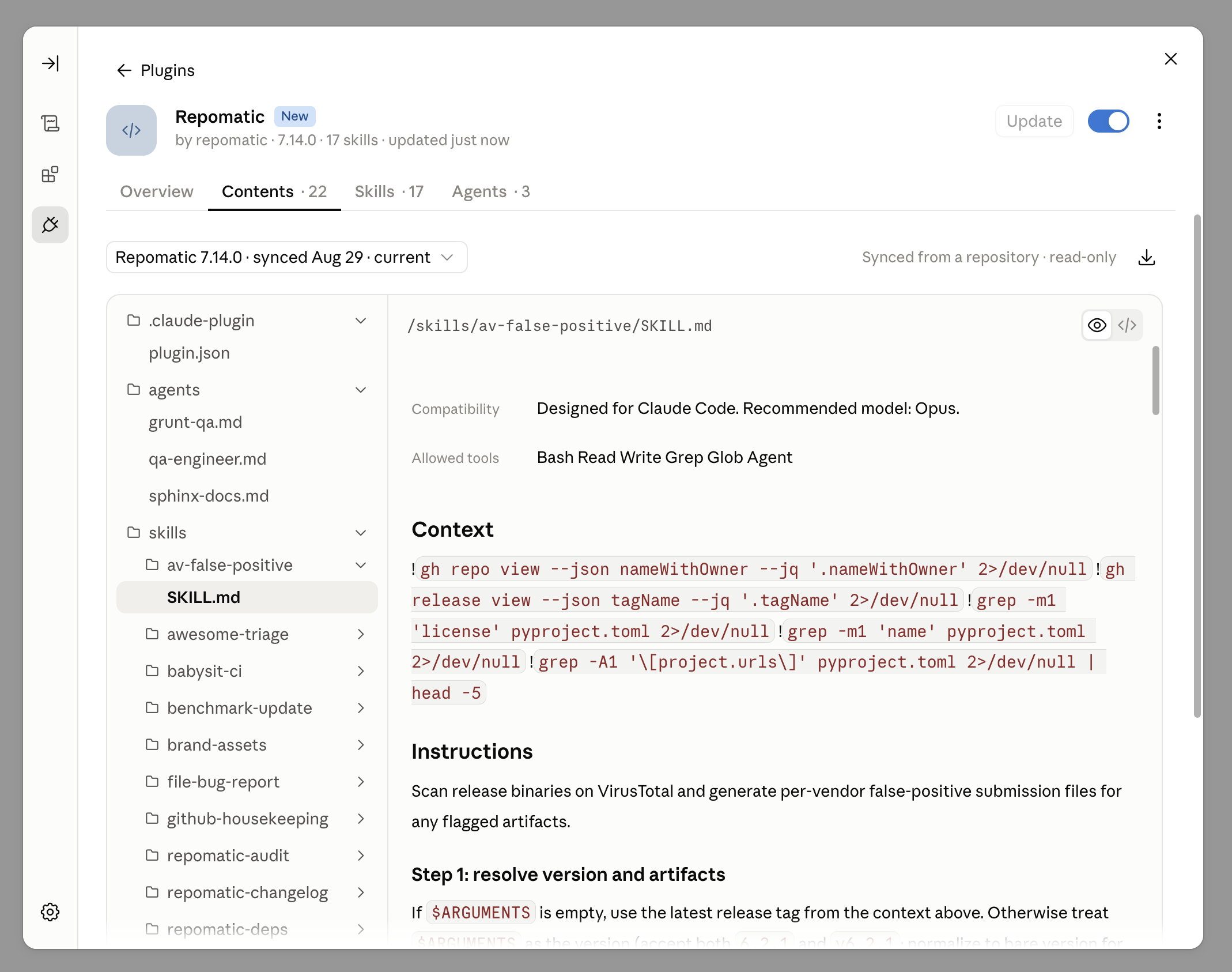
That directory is what the marketplace publishes and what the archive mirrors, so claude --plugin-dir .claude in a checkout loads exactly what an install gives you. A marketplace install shows that tree back to you, read-only:
Warning
Do not add an agents path to the manifest to publish the assets from somewhere else. claude plugin validate --strict accepts one and Claude Code then loads zero agents, with no error anywhere. This was measured against Claude Code 2.1.220: claude plugin details reported Agents (0) for the custom-path layout and Agents (3) for the default one.
How the pin moves¶
The entry’s two halves move differently, and the difference is the point:
refround-trips. A release commit’s freeze writesvX.Y.Z; the post-release unfreeze walks it back tomain. So/plugin marketplace add kdeldycke/repomatictracks the default branch and gets each skill fix as it lands, while/plugin marketplace add kdeldycke/repomatic@vX.Y.Zinstalls exactly that release. Tags older than the release that introduced the plugin carry no marketplace entry.versionratchets forward. It names the last published release and is never walked back. Left on a.devNvalue it would advertise a release nobody can install.
Note
The CLI does not read that catalog version to decide whether an update is due. It compares the plugin’s own .claude-plugin/plugin.json, which is why the release freeze stamps both and why they must never disagree.
Measured against Claude Code 2.1.274 on 2026-09-29, on a scratch marketplace carrying one plugin, for a path source and a git-subdir source alike. Bumping plugin.json alone made claude plugin update report updated, 1.0.0 to 9.9.9. Bumping the catalog entry alone left it up_to_date. The two controls held: bumping neither reported up_to_date, bumping both reported updated.
The Desktop app does not need either one to move. Measured against Desktop 2.9939.4 on 2026-09-29, on a catalog with a github source and no ref: plugin.json and the catalog entry both stayed at 1.0.0, and Update replaced the account copy with the newest commit of the default branch. anthropics/claude-code#20697 reports the opposite, its Update button staying greyed out until the catalog entry moves, which I did not reproduce. Keeping both manifests on the same string is what makes the disagreement moot.
Pinning the tag everywhere would be the tidier-looking choice and is the wrong one twice over. A tag never moves, so an entry frozen to one makes the app’s Sync automatically a no-op between releases. And a pin naming the last release breaks outright whenever the plugin’s own layout changes, which is what happened when the manifest moved into .claude/: the previous tag’s tree has no manifest for the catalog to find.
Where the archive comes from¶
Every GitHub release also carries a repomatic-claude-plugin.zip asset, built by repomatic pack-plugin in the release workflow’s pack-plugin job and attached by the release engine’s extra-assets job, which also attests it. The marketplace does not fetch it: the archive is for offline installs and for the Claude Desktop upload below.
Integrity comes from the release attestation:
$ gh release download --pattern repomatic-claude-plugin.zip
$ gh attestation verify repomatic-claude-plugin.zip \
    --repo kdeldycke/repomatic --signer-repo kdeldycke/repomatic
The plugin manifest carries the version the CLI compares against your installed copy (see § How the pin moves), and pack_plugin stamps it into the archive’s copy at pack time, so it always matches the release the archive came from. The checked-in manifest is written by the same freeze that moves the catalog pin, because a git-subdir install reads that file rather than a packed one. Keep the version out of the archive’s filename as well: the app-side upload path derives the plugin name from the uploaded filename, so a versioned name like repomatic-claude-plugin-v7.13.0.zip installs as a duplicate plugin instead of updating the existing one (reported for Cowork in anthropics/claude-code#20697). The release asset is version-free for this reason, with the version carried by the release tag and the manifest instead.
Install without a marketplace¶
The archive is a plain plugin directory, so it works offline and without git:
$ gh release download --pattern repomatic-claude-plugin.zip
$ unzip repomatic-claude-plugin.zip -d ./plugins
$ claude --plugin-dir ./plugins/repomatic
--plugin-dir lasts for the session only, which also makes it the way to try a change to a skill before releasing it:
$ repomatic pack-plugin --output /tmp/repomatic-claude-plugin.zip
$ unzip /tmp/repomatic-claude-plugin.zip -d /tmp/plugins
$ claude plugin validate /tmp/plugins/repomatic --strict
$ claude --plugin-dir /tmp/plugins/repomatic
--plugin-dir also takes the archive itself. This is the quickest way to catch a manifest that loads fewer components than intended:
$ claude --plugin-dir /tmp/repomatic-claude-plugin.zip plugin details repomatic
Caution
claude plugin validate does not accept an archive. Handed one, it parses the zip header as JSON and fails with Invalid JSON syntax: JSON Parse error: Unexpected identifier "PK". Unpack first, as above.
Wire it into a repository¶
repomatic init plugin writes the marketplace and enablement keys into your repository’s .claude/settings.json, so collaborators are prompted to install the plugin when they trust the folder:
$ uvx -- repomatic init plugin
It merges rather than overwrites: your own permissions, hooks, and any other marketplace you already registered are left alone, and re-running it is a no-op. Move the destination with [tool.repomatic] settings.location if .claude/ is not at your repository root, the same way skills.location and subagents.location work.
Like skills and subagents, this component is opt-in: a bare repomatic init never touches your settings. Name it explicitly, or list it under [tool.repomatic] include.
Note
Claude Code only prompts each collaborator to install a plugin a project declares; it never installs one on their behalf. So declaring the plugin does not guarantee every collaborator has it, which is why repomatic init skills and init subagents remain available and unchanged.
Install in Claude Desktop¶
The same archive installs into the Claude Desktop app, covering its Chat tab, Cowork, and claude.ai. None of those read the skill directories on your machine, so the plugin is the only way to reach them.
Grab the asset from a release, then in the app open Customize > Plugins and choose Add > Upload plugin:
$ gh release download --repo kdeldycke/repomatic --pattern repomatic-claude-plugin.zip
That is the only panel the archive goes through. The Customize > Skills uploader beside it refuses any zip holding a .claude-plugin/plugin.json, and wants a bare skill folder at the archive root instead, so it cannot take a plugin at all (anthropics/claude-code#20697, measured on Desktop 2.9939.2).
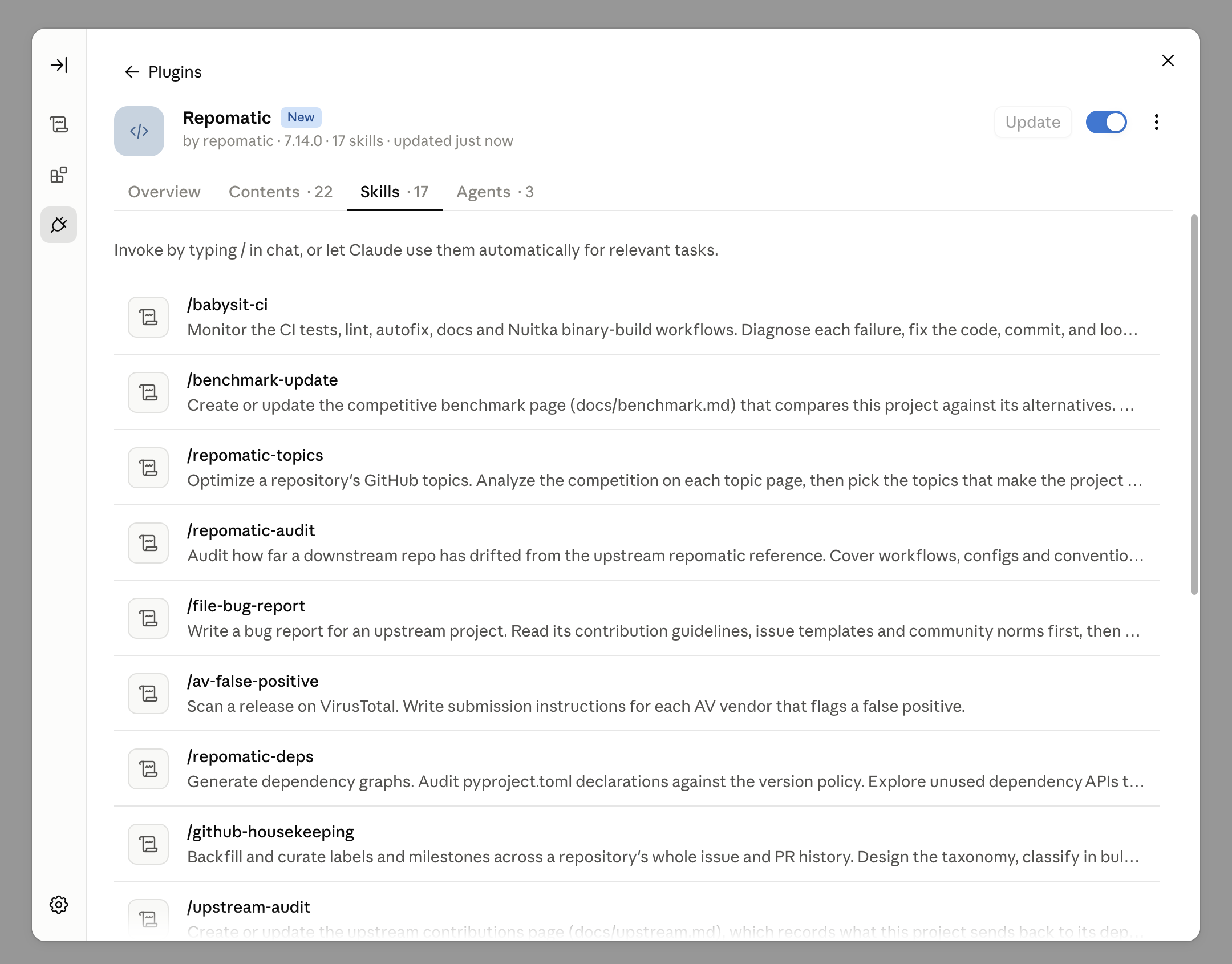
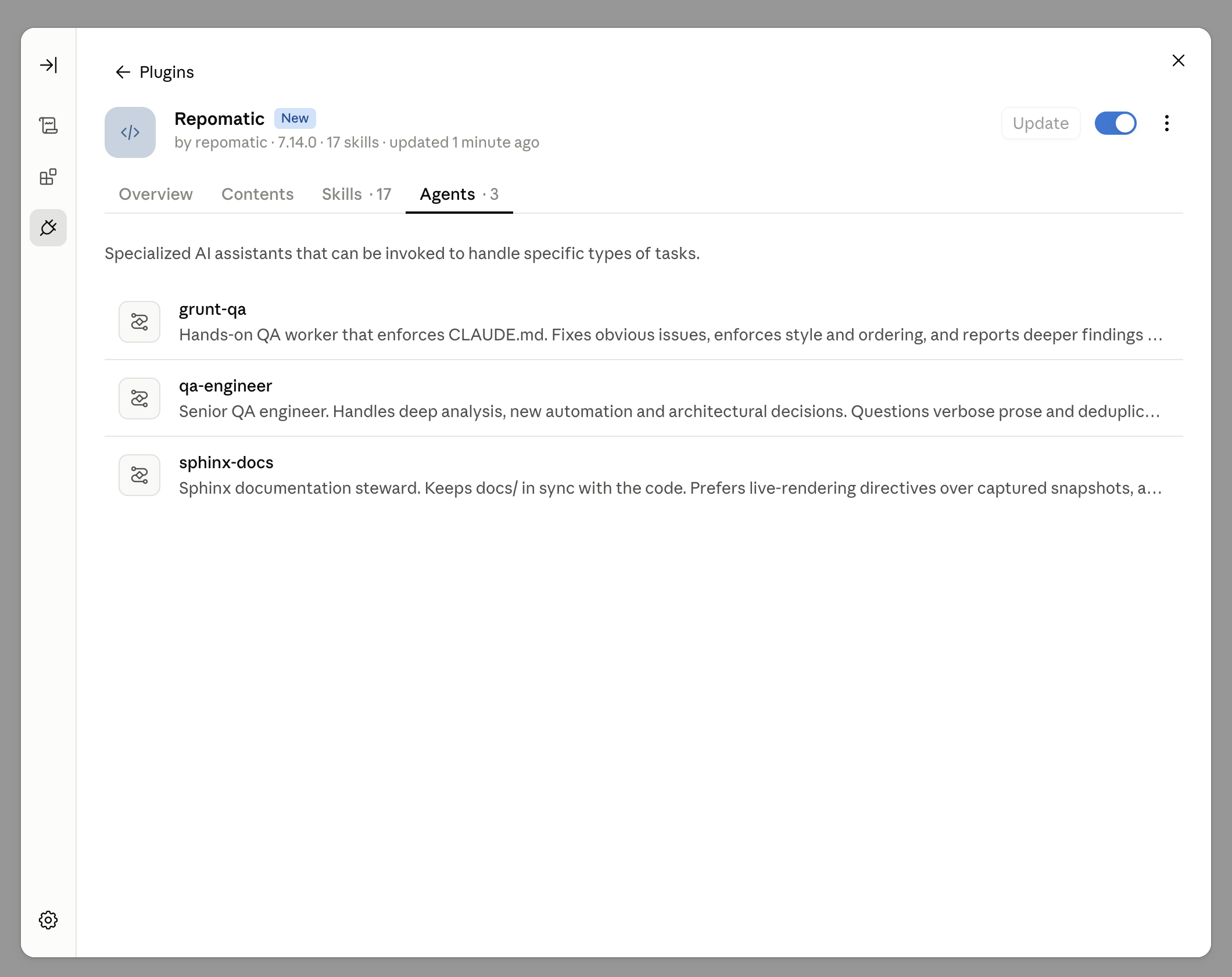
Every skill and agent arrives in that single upload, listed under the plugin’s Skills and Agents tabs and invocable by typing / in chat. The marketplace route below populates the same two tabs:
Note
An uploaded plugin carries no update channel: its ⋮ menu offers Disable and Remove and nothing else, with no version shown and no way to check for one, so each new release needs a fresh upload and a stale copy announces itself nowhere. That is the cost of this route compared to the marketplace one, which Claude Code keeps current on its own.
The app’s Add > Add marketplace flow takes the same kdeldycke/repomatic catalog, and is the better route: it carries the version, the update check and the source listing an upload has none of. It rejects an archive source outright, with External plugin source type 'archive' is not supported. Supported types: git-subdir, github, url in ~/Library/Logs/Claude/main.log behind a bare “Marketplace sync failed” in the dialog, which is why this catalog publishes a git-subdir source.
The host has to be GitHub, GitLab, Bitbucket or GitHub Enterprise. A self-hosted forge is refused with This host isn't supported (anthropics/claude-code#20697, reported against a Gitea instance).
Keeping the plugin current on every push needs the GitHub App, and that switch starts off: Sync automatically sits in the ... menu beside the marketplace name, next to Synced commit and Check for updates. Without the app it refuses:
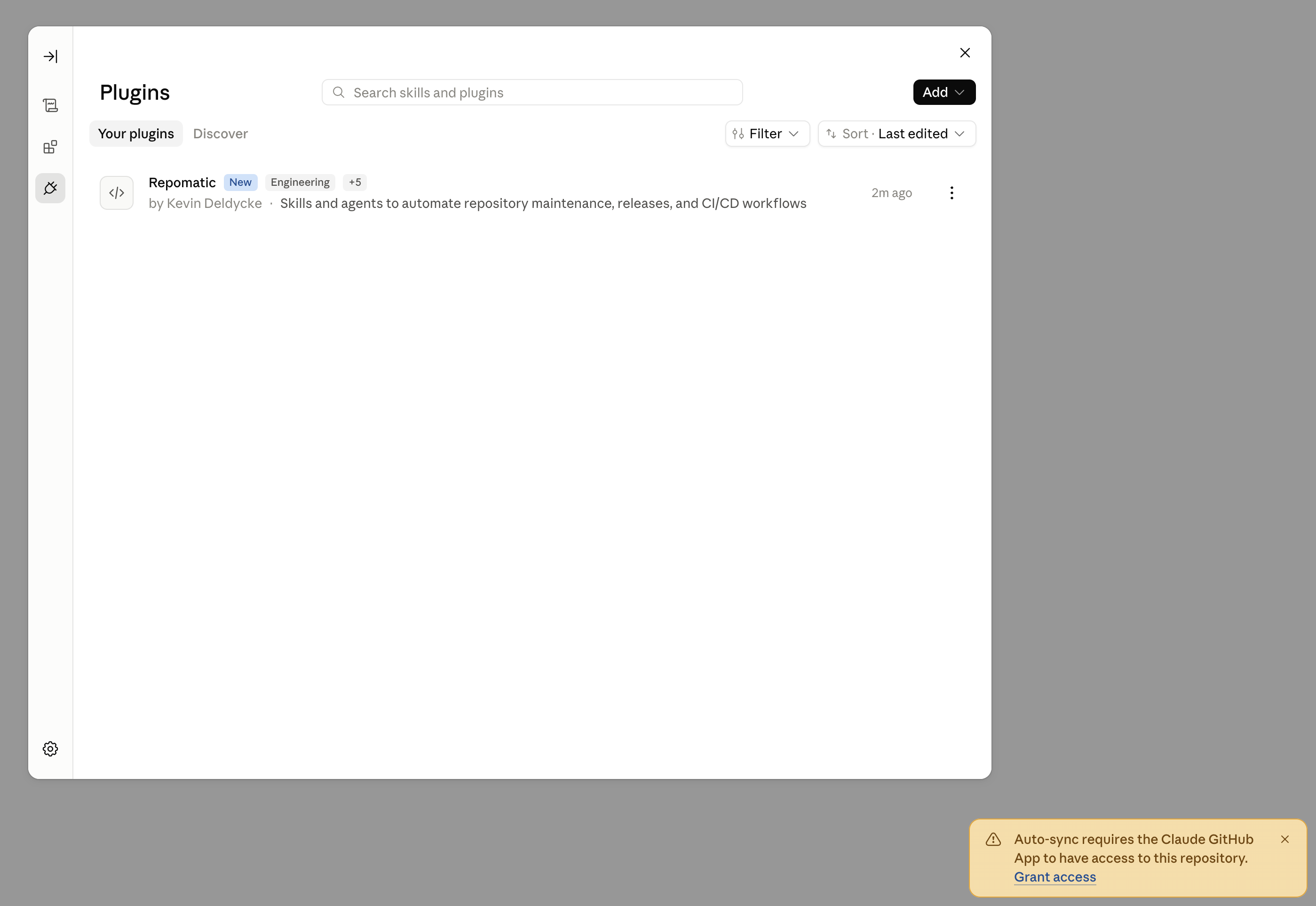
The same refusal reaches the log as Automatic sync on push requires the Claude GitHub App to be installed on this repository, with error code github_repo_not_accessible. Install it from the link in that warning, or from https://github.com/apps/claude/installations/new, and scope it to the repositories whose catalogs you sync.
Weigh that grant before taking it. The app is the Claude Code GitHub teammate, and marketplace auto-sync reuses its installation rather than asking for anything narrower, so it arrives holding read and write access to actions, checks, code, discussions, issues, pull requests, repository hooks and workflows. Without it the plugin still installs and still updates when you ask it to; all you lose is the app noticing a push on its own.
Both routes supersede the per-skill archives this repository used to build for the Customize > Skills panel: one plugin carries every skill and every agent, which separate skill archives never could. That packaging script is gone as of 7.15.0. See #2540.